
When a link is not enough
Link, image or keyword: getting Basetao to the right item
A find is only useful if the agent can reach it. Three modes sit behind the search box on basetao.com, and a paid fallback sits behind those. Here is which one to use, and what to put in it.
The three doors
Start with the one that loses the least information
The selector beside the search box has three positions, and they are not equivalent. A link is an exact address, so nothing has to be interpreted. An image has to be matched against a catalogue, which works well for distinctive shapes and badly for plain black hoodies. Keywords depend entirely on the words you type.
Use them in that order. If the card in front of you carries a working link, the job is one paste and you are done.

What to do when the link is dead
Listings expire. That is the normal condition of any catalogue, not a sign that the find was fake, and it is why the item name on a product card matters as much as the link. Work down this list.
Copy the item name from the card, exactly as written
It is the wording the seller used, in Chinese. That string is the single most useful thing on a card, and it is why keyword mode works at all for a find you did not source yourself.
Paste it into keyword mode
You are looking for the same product from a different seller, which for most items on a catalogue is a solved problem within a page of results.
If that fails, switch to image mode
Use the picture from the card. Distinctive silhouettes and prints match well; plain garments do not.
If that fails, hand it over as a Search for me order
The form asks for a picture URL and an item name, both required, and a free text field for anything else you know. Its own page states a fee of 1 CNY, refunded if the item is not located.
Tell them what you actually need in the free text field
Size, colourway and the seller you originally saw it on. The person searching has your picture and nothing else, so every detail narrows a very wide search.
One service, two different prices on two official pages
Worth knowing before you rely on either. The Search for me page states the service fee as 1 CNY with a refund if the item cannot be located. The Search for me card on the home page describes the same service as provided at no additional cost.
Both sentences were on the site when we read it on 2026-08-04. Neither is expensive enough to matter much, but if you are budgeting a large order, ask support which one applies and keep the reply.
Read the Search for me page yourself
how_make/search_goods.html, read 2026-08-04. The other wording is in the basic services grid on the home page.

Three ways people lose an item they had already found
These are common ways to lose the information needed to find an item again.
Translating the name into English
Try the original item name or seller URL first. If keyword results differ, compare the model and variant rather than assuming the closest photograph is the same product.
Screenshotting instead of copying
A picture of a listing loses the name and the link, which are the two things that would have found it again. Copy the text as well as the image.
Waiting until the link dies
If a find matters to you, put it into an order or save the item name today. Listings are removed without notice and nothing on our side prevents that.
Assuming a sold out listing is gone forever
On these platforms the same product is usually carried by several sellers. The name finds the others.
Once the item is found, say what you need in the same breath
The moment you place the order is the cheapest moment to ask for anything. The help centre names two places to do it: the make a notation field when you place the order, and the message bubble on the item afterwards.
What goes in there is the difference between a photograph that answers your question and a photograph that does not. Name the measurement, name the detail you want pictured, and name the version you expect.
The other half of a link
How to judge a seller when all you have is a URL
A link carries two things: an item and a seller. The item is what you were looking at. The seller is what decides whether anything can be fixed later, and it changes completely depending on where the link came from.
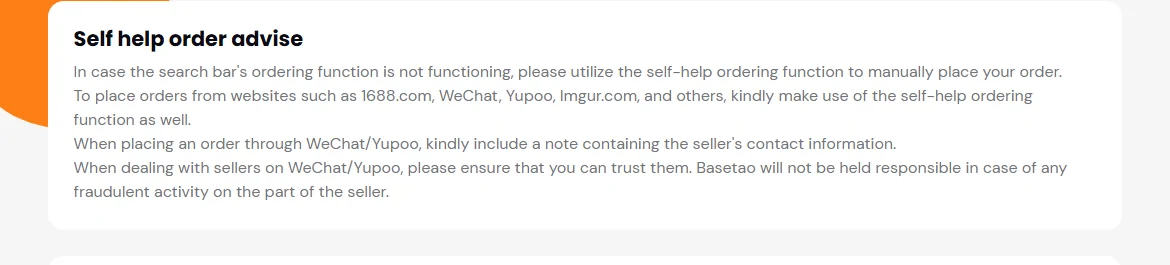
A Taobao or Tmall link sits inside a platform with its own dispute process, and that process is what the agent leans on when something is wrong. A 1688 link is a wholesale listing, so expect minimum quantities, batch variation between units, and a seller who is not set up to answer questions from one person buying one thing. A WeChat or Yupoo link has no platform behind it at all, and Basetao says so plainly on its self-help ordering page: make sure you can trust them, because it will not be held responsible for fraud on the seller side.
So the test is not whether the seller looks reliable. It is what happens if they are not. On the first two there is somebody to escalate to. On the third there is you, the screenshot you kept, and the note you left on the order.
Next step.
- Judging a find covers what to ask for once the item is in the cart.
- Help has the official contact routes and the stated service hours.
Place the Basetao order and make the first payment
- Open the original seller URL and save the product name, colour, size, quantity and any minimum order requirement.
- Paste the URL into the agent’s buying search. If the listing cannot be imported, use the self-help order route and provide the missing seller and product information.
- Compare the imported options with the listing. Write a specific note such as “measure the insole in centimetres” if that check affects your decision.
- Review the goods price, domestic delivery and any selected service. Check the payment method’s conversion and handling charge before confirming.
- Follow the order status until warehouse arrival. The first payment does not normally pay the later international parcel invoice.
Next: review photos and choose additional checks, then quote the parcel.